The first cloud implementation that we could deploy is one that gives us visibility into the usage of our devices. This is a very small initial start, but has all the pieces of internal development, using third party software, using third party cloud integrators, and setting up DevOps for our cloud.
I talked to you about amplitude and kinesis. We use both for tracking users at my current company. We use amplitude for vanity/reality metrics in a 1:1000 scale. We use kinesis to track each users events so that we can drill down to a specific user when we want to know more.
There are two parts to the implementation I have in mind:
- A quick implementation with Amplitude that helps demonstrate what we can get from event logging, and get vanity/reality metrics
- A complete cloud implementation using kinesis which will receive and store individual events, and use external tools to generate reports
I am suggesting that we do both.
Amplitude
Amplitude is a pretty good tool that we use at my present company, whenever we want to ask questions about our users. A very solid example for you could be, “How often are our devices switched on?”
Amplitude Demo
I am including some examples of reports that I generated from their demo data. I believe that it would be an introduction to what we can do with the data. You can look at the reports at the demo site if you want to dig deeper.
The point I am making here is that if we had only two events being sent to amplitude, a poweron, and a poweroff event, we would be able to get meaningful usable data.
New user retention
A new user is counted when a device that has never been seen in the amplitude system is seen for the first time. From that point if the user generates an event on any day “n” then the user is considered n-day retained. Think of an app that a user installs. At first launch they become a new users, next time they launch again they are retained for that day.
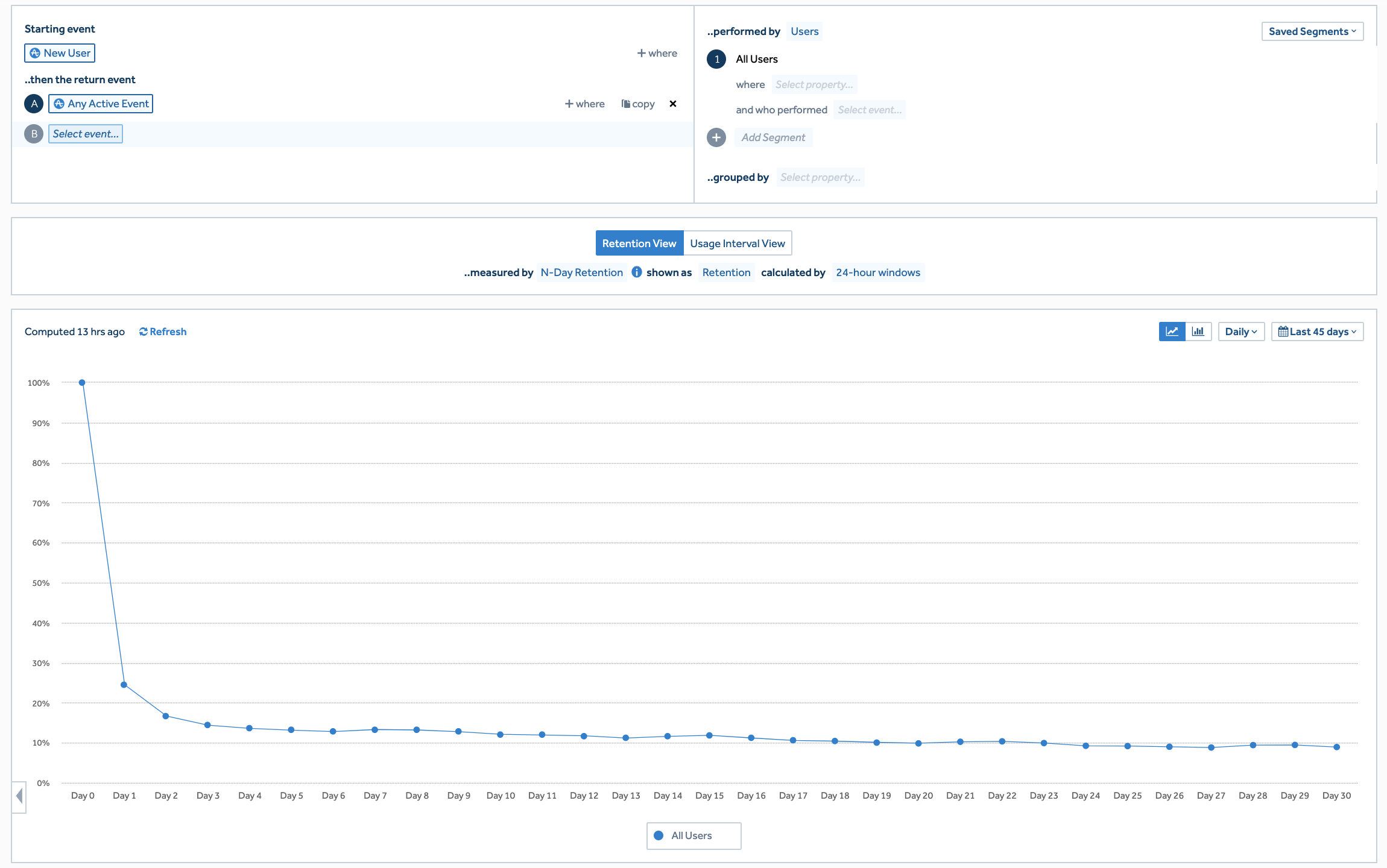
The chart above is an example of app retention (where user needs to launch the app). In our case, first device power on would count as a new user, and if the user switched it on again anytime/day after that they would be n-day retained.
A preloaded app with background services typically has a 30 day retention of over 70%. “What should be counted as a retained user?” is usually a very passionate discussion.
Daily active users
A daily active user is one who uses the device/app daily. Even if the phone/device is not connected to the internet every day, the day that they do, it will upload a backlog of all events stored. So if the device has been turned on it will count as a daily active user for that day.
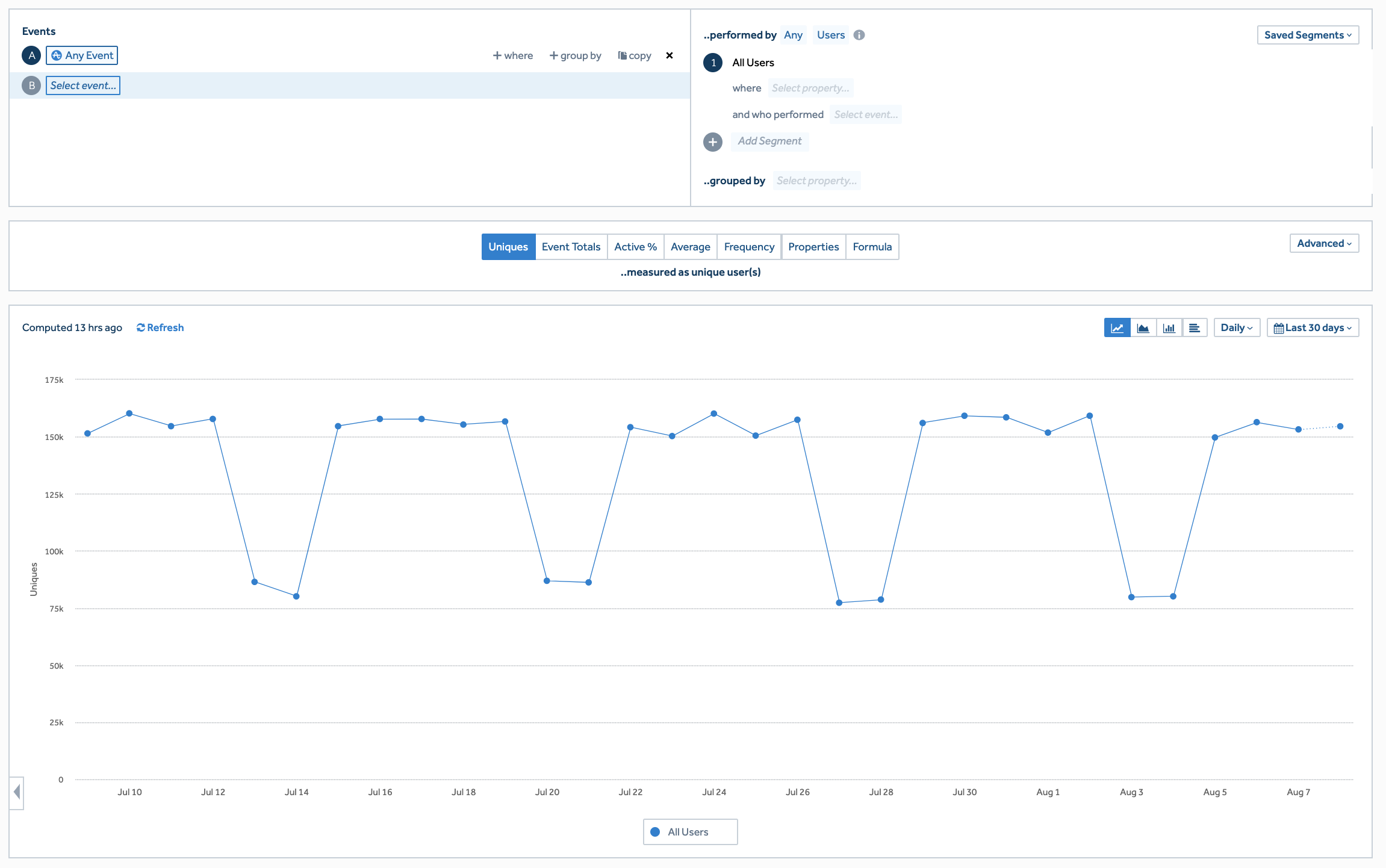
This is an example of an app being used Monday to Friday, with the number of users on the weekend being low.
Monthly Active Users
A monthly active user is one who has at-least one event in a month. Notice that this chart has only one change from the Daily active user, I converted the line diagram into a bar chart.

In this case it means that there were 500k users, but from the Daily active user chart, an average 140k users came in daily.
Where are the users?
This chart, groups the monthly active users by the country where their events were sent from. Amplitude uses the IP address of the users gateway to designate/determine the country that it is receiving events from.

The only difference in this report (from the Monthly Active Users report ) is I grouped it by country.
More details about amplitude is available at https://amplitude.com/. Take a look at https://analytics.amplitude.com/demo/. There is a whole bunch of reports that demonstrate the amplitude system.
Amplitude integration
I can help walk an engineer through an integration of amplitude. There are details available at https://help.amplitude.com/hc/en-us/sections/201146908-Amplitude-Quick-Start-Guide and an android programmers guide is available at https://help.amplitude.com/hc/en-us/articles/115002935588-Android-SDK-Installation
I expect that it would be straightforward, but I have not considered here the fact that our device does not have Google Play Services. We wont know till we try. I expect that initial testing will take just a day or so.
Next Steps
There are more items that will need to be looked at, debug version testing vs production release, billing, and a couple of more items before deploying amplitude. I am confident that the overall process can be implemented in under 12 days from start.
Kinesis
All of what I have described for amplitude can be implemented with Kinesis. This begs the question of why do we need to do this if it is available with amplitude?
Amplitude is good for visualization. It is not so great for programmatic queries and long term storage of data. At the maximum it allows queries for up to one year. If we want to use our data programmatically now and in the future we should have complete control of the data.
A pretty good introduction to kinesis is at: https://aws.amazon.com/kinesis/data-streams/

At a high level, we will achieve exactly what we can get with amplitude, the pieces that will make up this kinesis based solution will be…
- Kinesis data stream integration
- Amazon EC2 Instances for data collection
- Deploying in Multiple regions (US and China first)
- Connecting to third party data analysis tools for data visualization
- Internal/third party DevOps team
Kinesis Data Stream integration
We will need to integrate the Kinesis libraries into our core android application. We will support store and forward of all event streams on the device, to support the case that the device is not always connected to Wifi. Data will be flushed from the device whenever internet connectivity is available.
Kinesis documentation is available at: https://docs.aws.amazon.com/streams/latest/dev/developing-producers-with-sdk.html
Android app integration docs and sample is at: https://github.com/awsdocs/aws-mobile-developer-guide/blob/master/doc_source/how-to-android-kinesis-data-stream.rst
Amazon EC2 instances for data collection
The Kinesis data stream needs to be connected to a data receiver in the amazon cloud. There are multiple options at multiple price levels. I have selected EC2 (with a database backend) to receive and process events. This will be our cloud application which will receive and process the data.
There are other choices like AWS Lambda, Spark, and Kinesis data analytics, and this will be decided based on Cost, Realtime reliability and scalability requirements.
There are many open items that have to be figured out based on the cloud infrastructure deployment plans.
- What is the database we will use for event storage/analysis/query?
- How long will the event data be available?
- What are the long term storage requirements? S3 Data Lake, Glacier?
- What are Privacy Shield considerations?
- What are country specific data storage rules?
- What are customer/partner specific storage requirements?
While I am focused on the needs of event processing, the approach to scaling this to app services is not very different.
Deploying in Multiple Regions
Depending on our deployments, we can either direct all clients to a single region (US) or setup processing local to the region. It is linked to deployment of our devices. I have considered US and China first. For example…
- Asia is better supported from the Singapore Region
- LATAM is better supported from the US region
- Europe can be supported by US region, but performance requirements will decide
- China can only be supported through In-country AWS support (not all AWS features are available)
Connecting to third party data analysis tools
There are many data analysis tools, like tableau, that we can connect our dataset (in aws) to. The choice of tools we select will be based on the real time performance that we want from the entire system. The intention is not to duplicate amplitude, but to have a system over which we can layer new features that we wan to deploy.
At present I am partial to third party tools because we can create reports as and when we feel a need. As the system matures, we could change this approach.
Internal/Third party DevOps
The Kinesis based system is going to need DevOps. There are parts of this which can be outsourced, but it will require one DevOps person internal to the company to be able to make a decision when required to do so.
Summary
There are multiple ways that we can attack the cloud requirements. I chose this as an example project that kind of outlines the requirement definition internal to the company. The deployment of this solution can be done with an internal team, or outsourced to a third party cloud company that we choose to evaluate.
I have focused on AWS, that I have some knowledge of. Microsoft Azure and Google Cloud all have similar services available.
I have not considered the case that the customer might not want the device to connect to our cloud, and only connect to theirs.
 Samyeer Metrani